
Smart Token Display with voice
Bright red LED panel (P10, 32×16) with a built-in speaker amplifier and natural voice announcements.
- Up to 5 characters: 45, A045, OPEN
- Female, male and robot voice
- Own Wi-Fi, Android app included
The Jenix Smart Token Display shows the token number on a bright LED panel and announces it in a clear, natural voice. Staff call tokens from an Android phone over the display's own Wi-Fi, with no internet and no PC.
When people can see and hear whose turn it is, they sit and wait instead of crowding the counter.
Customers wait seated. The counter stays clear and your staff can work.
First come, first served, visible to all. No arguments about who was first.
The display announces the number clearly, at the volume you choose, even in a busy hall.
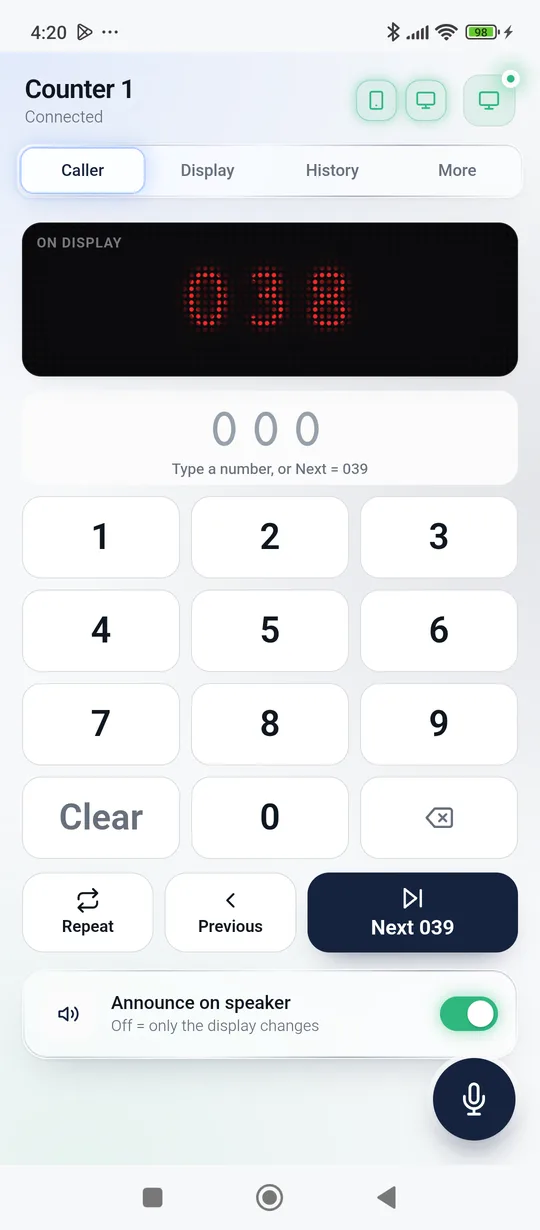
One tap calls the next token. Repeat, go back or call any number from the keypad.
A paper token today, or a printed token from the Jenix token dispenser (coming soon).
On the Android app, or on a wireless remote button (coming soon), so no phone is needed at the counter.
“A045” lights up on the LED panel and the voice announces it, with an optional ding-dong first.
No crowd, no confusion. History keeps a list of every token called today.
The free Jenix Smart Token Display app is the only control you need. The display box simply follows it.
Start with one display and add more as you grow. Every installation is different, so tell us your counters, room size and language, and we will suggest the right setup and share a customised quote.
Available ready to order Coming soon in development Custom build made to your requirement
Bright red LED panel (P10, 32×16) with a built-in speaker amplifier and natural voice announcements.
Two or four panels for bigger digits, longer messages or “Counter 2 → A045” on one display, for large halls.
A second display that mirrors the main one for another hall, a waiting area or the other side of the room.
One central display showing the current token of every counter: “1 → A045 · 2 → B012 · 3 → C007”.
Show the queue on a TV or a full-colour LED screen, with your logo, notices or offers between calls.
Free with every display. Caller, keypad, voices, messages, clock, history and Hold to Talk. No login, no account.
A small radio remote at the counter with Next, Previous, Repeat and Reset. No phone needed during the day.
A fixed desk button or keypad for each counter, wired or wireless, so each counter calls its own customers.
Customers press a button and get a printed token with the number, date, time and your shop name. The number goes straight into the queue.
A touch screen where customers choose the service and get their token: for hospitals, banks and service centres.
Hindi announcements, other Indian languages, and a closing phrase recorded for your business.
Happy / Neutral / Unhappy buttons at the exit, plus daily counts of tokens served and waiting time.
Mounting, wiring and setup of displays and speakers, staff training, and help when you need it.
A starting point for the conversation. We adjust every setup to your place.
One token display with voice + the app. For pharmacies, labs, small clinics and shops.
Display + loud voice “please collect your order” + remote button at the kitchen pass.
Display in the waiting room + token dispenser at reception + doctor's call button.
Multi-counter main display, call button at each counter, token kiosk with service selection.
OPD, pharmacy, billing, sample collection.
Order ready calls at the pick-up counter.
Cash, loans and enquiry counters.
Sample collection and report counters.
Help desks, service and delivery counters.
Admissions, fees and document counters.
Walk-in customers called in order.
Billing counters, returns and pick-up.
| Calling by voice / paper list | Jenix Smart Token Display | |
|---|---|---|
| Customer knows whose turn it is | Only if they heard it | Seen on the display and heard on the speaker |
| Clear announcement in a noisy hall | Staff must shout | Natural voice at the volume you set, can repeat |
| Staff can stay at the counter | No | One tap on the phone (or remote) |
| Messages and clock when idle | Paper notices | WELCOME, LUNCH BREAK, scrolling text, clock |
| Internet or computer needed | No | No: the display has its own Wi-Fi |
| Grows with you | No | Add displays, remote buttons, dispensers |
No. The display creates its own Wi-Fi. Staff connect an Android phone to it and use the Jenix app. Everything works offline.
Any Android phone or tablet running Android 6 or newer. The app is free, with no login and no account.
For example: “Token number A 0 4 5, please collect your order”, with an optional ding-dong first and an option to say it twice. Natural female and male English voices are built in today, and Hindi voice announcements are in development. Hindi text can already be shown on the display.
The voice is stored inside the display, so it announces instantly. To call the next token you need the app, or the wireless remote button once it is available.
The display keeps its settings, and its clock keeps time on its own battery-backed clock chip. Staff continue from the app as before.
The standard display is one P10 LED panel (32×16 dots), about 32 × 16 cm, with up to 5 characters. Larger displays with more panels, more characters or a counter number are made to order.
It depends on the number of displays and counters, display size, add-ons and installation. Send us your requirement on WhatsApp and we will share a customised quote.
Yes, we can deliver, mount and set it up, and show your staff how to use it. Ask us about your city.
How many counters, how big the room is and which language. We will suggest the right setup and send a customised quote.